Showing posts with label iphone. Show all posts

Monday, 3 February 2014

GuestMode: Allow others to use your phone freely

By now if you have been on twitter and reddit, if you follow the right people and the jailbreak subreddit, you may already know what the new tweak 'GuestMode' is. 


Developed by @ianb821, this tweak allows you to have a "guest mode" on your device. You must set a password, or you can use an activator action to enable and disable GuestMode. 


At the bottom left, you can also place it at the right, is the GuestMode button. When you slide to unlock and it asks for your passcode, just click on 'Guest' and it'll unlock your device, but also with limited features that are set up in settings. 


You can enable and disable the features above, when turned off the guests are not allowed to access them. 


If you go to the 'Enabled Apps' section you can choose what apps the guests can use, and yes you must choose what they can use, so you must click on each app that is allowed in guest mode. 


As you can see I have some important apps disabled so the guest can not access it at all. 

This is an amazing tweak, for what it's worth, it will be available for $.99, it's well worth the money. 

As always leave us some comments below, as make sure you follow the dev @ianb821! 

Thursday, 30 January 2014

HideHomeTime: Remove status bar time on your homescreen

The status bar on iOS have a lot of useful information that is helpful to all users, but some people think it's too cluttered. Thanks to 'HideHomeTime' you can make that status bar less cluttered. 


The status bar before the tweak installed, and below is after it's installed. 


As you can see all this does it remove the time on the status bar, some may think this is useful, and others might think differently. If you have a widget for your time on the homescreen then this tweak would be perfect for you. 

This tweak is available on the BigBoss repo for free and is developed by Julian Weiss, aka insanj. 


If you have any comments or suggestions please leave them down below. 

Monday, 6 January 2014

Review: No Switcher Icons


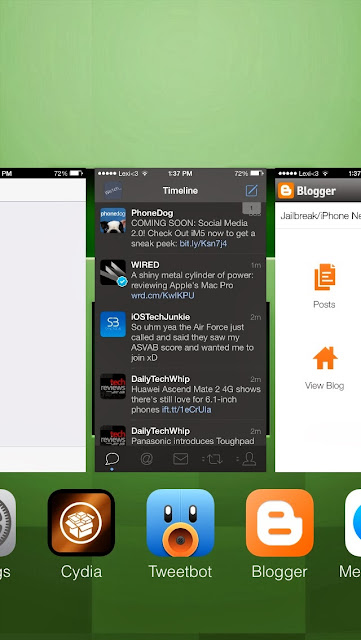
The multitask switcher, everyone knows what that is, and in iOS 7 it had a major redesign. Some may like it, some may not. 

Thankfully there's a tweak to change that, and it's called "No Switcher Icons".  This tweak does exactly what it's called, it removes the app icon below your app cards when you open the switcher. (Pictured above)

Sunday, 5 January 2014

How to make your status bar have a blur effect

When iOS 7 was first released we noticed that there were a lot of changes. But there was one that really stood out from the rest. Blurriness.

Basically the whole OS has a blur effect on it, when you swipe down the notification center, when you swipe up the control center, when you open folders and so on. 


Well why not extend that blurriness to let's say the status bar? That's what a new tweak called 'BlurBar' does. 

CCHide: easy way to hide sections in your control center


Ever since Apple unveiled iOS 7 at it's WWDC conference back in June, they showed off the Control Center (pictured above). The control center makes it easy to turn toggles on and off for airplane mode, wifi, DND etc.

Some say that the control center takes up too much space on their devices, especially if you have an iphone 4/4s. But there's a new jailbreak tweak that can fix that for you. CCHide